
IMPORTANT NOTE: Indeed is currently not accepting applications to the jobs search API at this time. However, those who were already approved before can still use the service.
Add more jobs for your job seekers via Indeed backfilling / job feeds software feature. Make additional pay per click revenues by having your job seekers click on jobs advertised. Feeds are activated via JobMount software Admin area. Your job board software will query 3rd party (aggregator) database seamlessly whilst running your normal job search and supply ads after your jobs results.
Configuration
1. Register an Indeed publisher account here.
2. Obtain your Publisher ID and Indeed Channel (if needed).
3. In JobMount job board admin, navigate to
Settings: General Parameters
4. Find the following fields
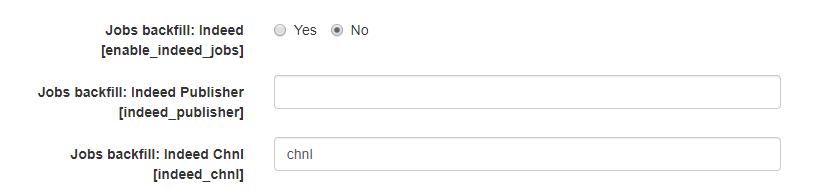
Jobs backfill: Indeed checkbox – set to YES;
Jobs backfill: Indeed Publisher – add your Publisher ID (The Publisher ID can be found within the Job Search API tab once you’ve logged into your Publisher account on Indeed);
Jobs backfill: Indeed Chnl – add channel or leave default;
Click SUBMIT CHANGES at the bottom of the page.
Jobs backfilled from Indeed will be displayed in the job search results under your organic jobs (manually posted by employers or auto-posted via spider/XML)
NOTE: Backfill jobs will not be stored in your database. When users click on these jobs, they will be redirected to the source website to complete the application process and you will get a revenue share.