
JobMount introduces Jobs2Careers publisher integration for job boards. Generate additional revenue from dynamic job feeds added to your job search results.
Include more jobs for job seekers on your job board from Jobs2Careers. You will generate pay per click revenue when candidates click on sponsored jobs.

Configuration
In order to activate Jobs2Careers jobs backfill, please do the following:
1. Create your partner account here
2. Acquire your Publisher ID and Publisher Password (in Feed Manager after registering with Jobs2Careers)
3. In JobMount job board admin navigate to
Settings: General parameters
Find the following fields:
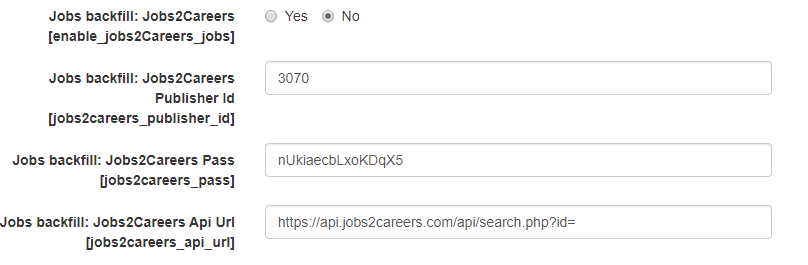
Jobs backfill: Jobs2Careers checkbox – set to YES
Jobs backfill: Jobs2Careers Publisher ID – add your publisher ID
Jobs backfill: Jobs2Careers Pass – add your publisher password
Jobs backfill: Jobs2Careers Api Url – leave default value as is and the system will automatically pull your id and password into it.
NOTE: Backfill jobs will not be stored in your database. When users click on these jobs, they will be redirected to the source website to complete the application process and you will a get a revenue share.
See also:
- Jobs backfill: Setting default search keyword and number of jobs
- Jobs backfill: Indeed
- Jobs backfill: ZipRecruiter