
Contents1. Overall view of the resume search forms |
Overall view of the resume search forms
1. Advanced (Employer: Advanced Resume Search)

2. Quick resume search form

3. Admin resume search form (Resumes section in left navigation tree).

Resume search forms editing
1. Navigate admin section of your job board application
Settings: Forms & search: Resume: Advanced resume search
Or
Settings: Forms & search: Resume: Quick resume search
Or
Settings: Forms & search: Resume: Resume search in admin
Choose the form to edit:
- Quick Search Settings
- Advanced Search Settings
- Admin Search Settings
2. System will open a list of fields configured by default. Edit the resume search form by:
- Editing existing fields (see Fields properties).
- Adding new ones (review Field types).
- Change fields order: Changing field sequence in forms.
i.e.
Open Keyword search field for configuring
3. System will offer following properties

4. Update fields properties.
5. Save settings.
Notes
- Don’t change existing fields’ Short Name as it may cause negative impact to job board’s functionality. Edit only the Name field if it’s needed.
- When creating a new field, make sure the Short Name is unique within this particular form.
Resume files indexing and search activation
1. Confirm if files can be uploaded by candidates to their resumes. Make sure the Resume file (“Applied file” type field) is available in RESUME SETTINGS: Resume upload file types configuration.
2. Turn attached resume file search on or off.
2.1. Navigate job board software Admin
Settings: Forms & search: Resume: Quick, Advanced or Resume search in admin
2.2. Open keyword search field for configuring

2.3. System will offer following properties
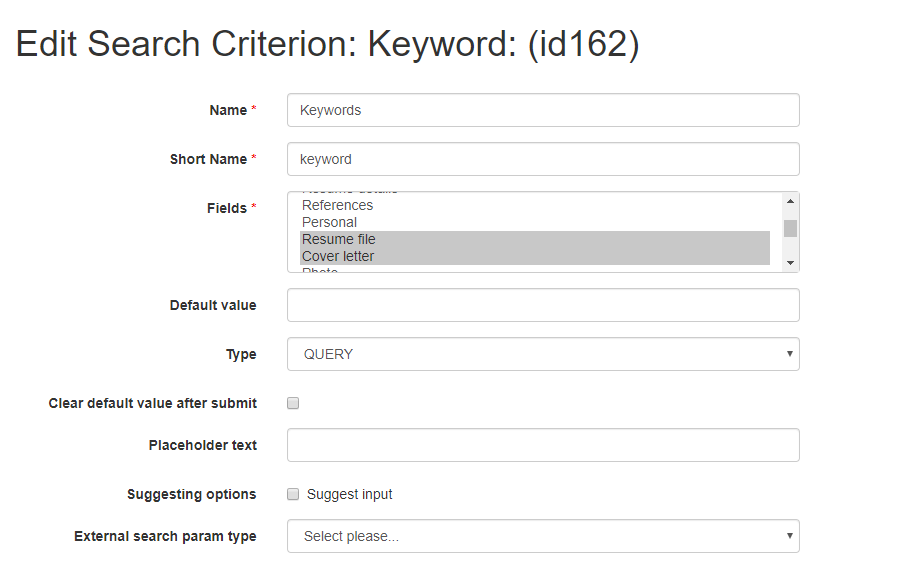
Fields multiple choice:
– Select resume fields to be searched by keyword search.
– Selecting Resume file field will activate keyword searching of indexed resume files via resume search.
– Leave the Resume file field un-selected if you do NOT want the attached files to be searched via resume search.
2.4. Save settings.