Job Board Software: Turnkey | Custom

Multiple revenue generation models & traffic sources
Connect to Facebook & LinkedIn, aggregator, mobile, more...

Expert job board software

Category:

New features

Facebook Login & Sign Up For Job Seekers

Improve job seeker registration ratio by offering easy sign up & login via Facebook. Candidates can register with job board software using  Facebook user credentials, share profile info and help promote your website amongst their Facebook friends.

Sign up
JobMount software connects user with Facebook to confirm username and retrieve personal details, i.e. first name, last name, etc. Information details (fields) to copy to job board when sign up are confirmed with job  board owner during initial configuration. These can be updated any time. Job board software prompts user to confirm or update details copied from Facebook account and completes registration process.

Returning visitor’s login
Returning job seekers will either be recognized by job board software or can use login via Facebook button for quick login. Job board software will welcome returning visitor for job seeker account linked to Facebook user already exists. If Facebook user is currently logged in to Facebook, job board application will login user automatically. If not – user will be offered to login to Facebook first.


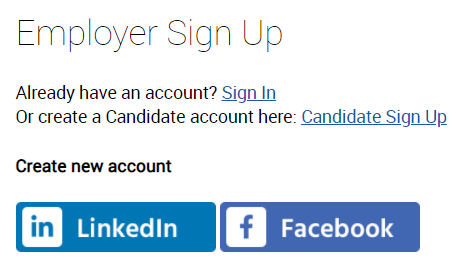
Software screenshot: job seeker registration, Facebook Connect option


Software screenshot: job board homepage, Facebook Connect sign up / login option


Key benefits for job board owners:

  1. Increase number of registrations by offering simple way to sign up & apply.
  2. Improved user experience for job seekers: personalized interface based on profile information, one click registration / job alert subscriptions, simplified application process.
  3. Advertise job board via job seeker Facebook wall.


Contact JobMount on adding Facebook login to your job board.

LinkedIn Login & Resume Autofill

Enhance and simplify job seekers registration by offering register via LinkedIn option. Job board software connects to candidate account via LinkedIn API and pre-loads resume using LinkedIn profile.

Job seeker sign up
New job seeker can choose job board to connect to LinkedIn software and retrieve employment and other information. All fields will be confirmed with job seeker prior to saving to job board database. JobMount fills out both job seeker account and resume profile fields whilst connecting to LinkedIn.  The fields to save are confirmed with job board owner prior to software configuration by JobMount team.

Resume population & editing
Job seeker can fill out resume profile by auto-posting data from LinkedIn. LinkedIn button is available on resume management screen for automatic population. Fields supplied can be reviewed and corrected by applicant prior to saving.

Software screenshot: job seeker registration, LinkedIn button will prompt for access and copy profile data to candidate account and resume


Software screenshot: pre-filled data fields can be reviewed & updated by job seeker prior to submitting the form


See also:

Facebook login & sign up
- More web2.0 features
- JobMount software features checklist

WordPress Blog & Job Board Software Integration

How do you make the best use of a blog for both job board SEO and vacancy advertising? Here are the key considerations for your job board software.

Look & feel
Based on your blog concept / goals: either customize your blog html/design to fully reflect your job board style and add to visitor “job board experience” or keep it simple by utilizing free WordPress template (“blog” style) & layout.


Standalone domain vs folder or alias on a job board?
Do you publish a blog on standalone domain? Or would you add it to main job board? Please consider the following:

  1. Folder (i.e. www.your_board_software.com/blog) – our recommendation
    - for it will help your SEO by organically adding to your overall job board content “weight”. The folder content will be indexed by Google and considered part of your main job site.
  2. Alias (i.e. http://blog.your_board_software.com)
    - alias / blog SEO will benefit from already established main job board ranking. But it will not add up to main board SEO.
  3. Standalone domain (i.e. www.your_blog_domain.com)
    - will help if your external job board linking suffers (i.e. link it to your job board from a well-page-ranked blog homepage).
    - does not add any content “weight” to your main board.
    - for certain businesses might have greater credibility / traffic / more subscribers if not linked to main “biased” job board brand (means more blog page / job views).


Free software for your blog
WordPress is our preference for it integrates seamlessly with JobMount software and provides variety of nice SEO features:
- SEO friendly links
- 301-redirect (for transferring existing pagerank to new URL)
- sitemap generation
- robots.txt management
etc.


Add dynamic content to Job Board pages via software RSS feature:

1. SEO: help your job board homepage and key landing pages obtain frequent updates by relevant content supplied via blog RSS.
2. Visitors conversion: increase your candidate retention by providing useful content to review/subscribe to.

Type of blog content usually available via RSS: latest posts, popular posts, latest comments, posts per category, etc.
Use JobMount software RSS reader feature to download the content and publish to job board automatically.


Advertise jobs on blog pages via RSS
Add job listings / adverts to your blog posts for both job seeker applications and SEO/ linking.


© Copyright 2008. All rights reserved
Aspen Technology Labs